


 ChatGPT
 Perplexity
 Claude
 Google AI
RCS vs SMS : Everything the User Needs to Know
SMS is the preferred channel for business messaging for over three decades. Dependable, universal, and battle-tested, it gets the job done.
But a new standard is changing what business texting can be. RCS (Rich Communication Services) delivers branded messaging, interactive buttons, read receipts, and rich media directly to the native messaging app; no third-party app is needed.
This change is bigger than most if your business does customer engagement in Salesforce. It’s not just “RCS or SMS?” It’s “How can I do both from my CRM without switching tabs?”
In this guide, we’ll explain what makes RCS different from SMS, when you should use it, and how a native Salesforce messaging solution like MessageBlink can help you leverage the best.
What Is SMS?
SMS (Short Message Service) has been around since 1992. It’s the world’s most universal form of mobile messaging—and for good reason.
This is what SMS is all about:
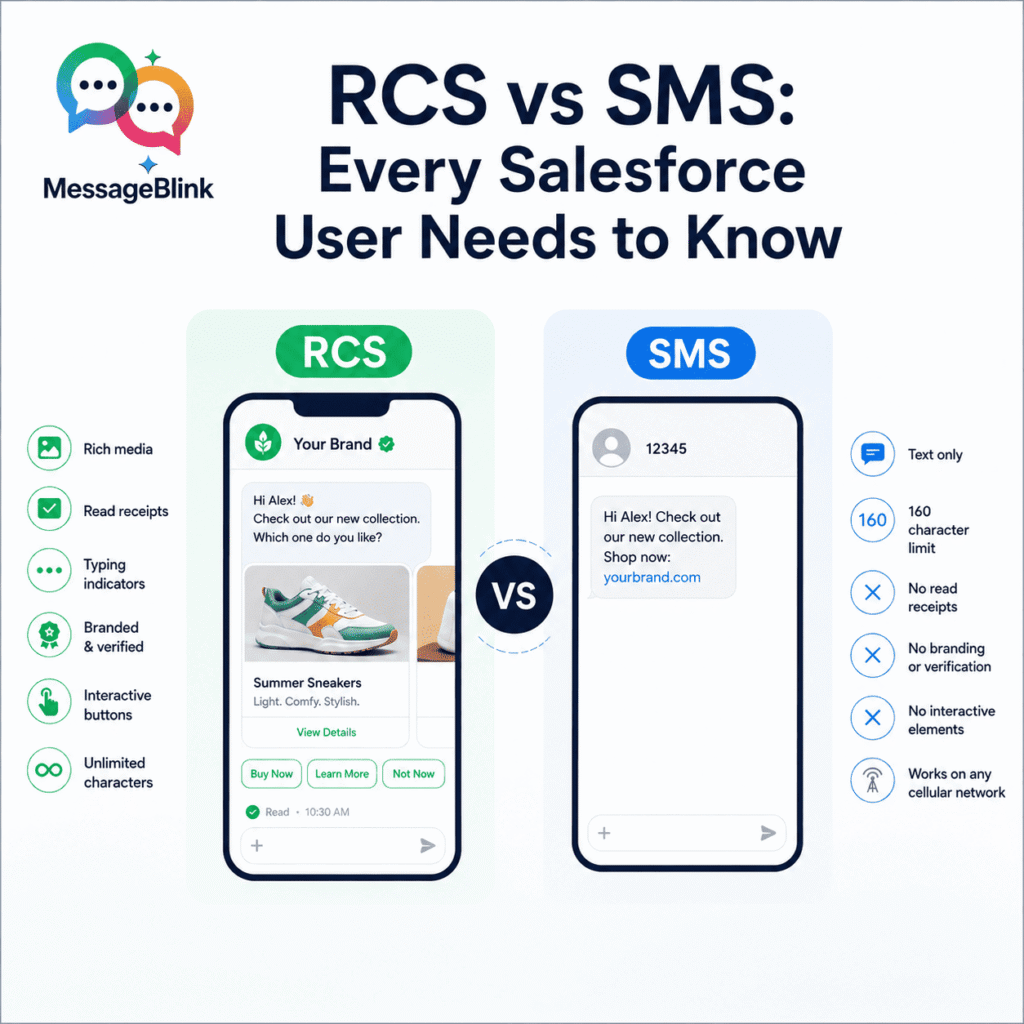
- Messages are limited to 160 characters (longer messages are split into segments)
- Text only. No images, video or interactivity
- Works on any phone – smartphones, feature phones, you name it
- Carrier delivery — routes through cellular networks, not the internet
- No data connection needed—if a device has cellular service, it can receive SMS
SMS can be used by businesses for transactional messaging like appointment reminders, OTPs, order confirmations, alerts, and notifications. 98% open rates and great delivery rates.
The catch? There is no branding, no interactivity, no way to validate that a message was actually read.
What Is RCS?
RCS (Rich Communication Services) is the next generation of messaging protocols that is meant to replace SMS. Think iMessage or WhatsApp functionality—except baked into the default messaging app on Android and now iOS.
RCS allows:
- Rich media—Images, videos, audio and file sharing in high resolution
- Read receipts and typing indicators — see when messages have been delivered and read
- Branded sender profiles – show your logo, your company name and your verified identity
- Interactive elements – quick reply buttons, carousels, suggested actions, rich cards
- Unlimited characters – Send long messages without any restrictions
- Real engagement, not just one-way blasts, two-way conversations
RCS messages use data networks (Wi-Fi or mobile data) instead of traditional cellular infrastructure. This unlocks a richer feature set — but it also means delivery is dependent on internet connectivity and device support.
For business, RCS unlocks use cases that SMS simply can’t support: product carousels in a text thread, appointment booking buttons in the message, branded customer service conversations, and interactive campaigns that feel like in-app experiences.
RCS vs SMS : The Main Differences
| Feature | SMS | RCS |
|---|---|---|
| Character limit | 160 characters | No limit |
| Media support | Text only | Pictures, video, audio, files |
| Read receipts | No | Yes |
| Typing indicators | No | Yes |
| Branding | No | Logo, colors, verified sender |
| Interactive elements | No | Buttons, carousels, quick replies |
| Delivery method | Cellular network | Wi-Fi/mobile data (data network) |
| Device compatibility | All mobile phones | RCS-enabled smartphones |
| Fallback option | N/A | Fallback to SMS if not supported |
| End-to-end encryption | No | Supported (implementation-dependent) |
1. Media & Content
SMS is text only. Sending pictures or video requires MMS, which comes with its own limitations such as file size caps, inconsistent rendering, and higher per-message costs.
RCS natively supports rich media. All high-resolution images, video files, audio clips, and documents are located in one conversation thread. For sales and service teams, this means product images, onboarding videos, and support materials can travel within the messaging experience, rather than going through a separate link.
2. Interactive
Anything other than reading in SMS requires the customer to exit the conversation: click a link, open an app, or make a call.
RCS keeps customers in the thread. Businesses can include:
- Quick reply buttons for one-tap answers
- Product carousels for browsing inside messages
- Suggested Actions such as “Schedule an appointment,” “Check invoice,” or “Contact support”
- Rich cards with images, text and calls to action in one unit
For Salesforce teams, this interactivity can directly reduce follow-up cycles and increase conversion rates—all without the customer having to switch channels.
3. Brand and Verification
SMS is sent from a phone number or short code. Your company name does not appear to the recipient; they see numbers. This makes recognition a struggle and leaves the door open to phishing and spoofing.
RCS supports verified sender IDs. Your business name, logo, and brand colors are displayed right in the message thread, and carriers verify this identity. That layer of verification is important in regulated industries like financial services and healthcare.
4. Delivery and Trustworthiness
SMS has the advantage here: near-universal reach. No smartphone, no data connection, no app needed.
RCS is dependent upon device support and data connectivity. Most implementations will automatically fall back to SMS if RCS is not available—but that fallback means missing out on all the rich features.
For a high-stakes transaction where you absolutely need to be sure that it gets delivered, SMS is still the safer option to send a message. RCS is a better experience than SMS for marketing, engagement, and conversion-focused campaigns targeting smartphone users.
5. Pricing
Pricing for SMS is straightforward. You pay per message segment, and prices vary by country and carrier. The media payload is generally cheaper than MMS.
RCS pricing is yet to be finalized. Rates vary by region, provider, and session model. RCS is often more expensive per message, but the higher engagement and conversion rates can make the ROI calculation attractive, particularly for revenue-generating use cases such as sales outreach or upsell campaigns.
RCS vs SMS vs MMS: The Quick Comparison
For a long time, MMS (Multimedia Messaging Service) was the middle ground, SMS with some basic media support. So how do all three fare?
| Feature | SMS | MMS | RCS |
|---|---|---|---|
| Text | ✓ | ✓ | ✓ |
| Images | ✗ | Limited | High-res |
| Video | ✗ | Tiny files | Larger files |
| File size limit | N/A | ~300–600 KB | 10 MB+ |
| Branding | ✗ | ✗ | ✓ |
| Interactivity | ✗ | ✗ | ✓ |
| Read receipts | ✗ | ✗ | ✓ |
| Device support | Universal | Most phones | Smartphones with RCS |
MMS works on more devices than RCS and supports basic multimedia messaging. But it lacks the interactivity, branding, and modern CX features that make RCS compelling. For most businesses, MMS is a short-term fix, not a long-term messaging strategy.
When to Use SMS vs RCS
Use SMS when:
- Priority is reach. You have to reach all the phones, including feature phones and phones without data connectivity.
- Reliability is more important than richness. Transactional messages – OTPs, delivery alerts, appointment reminders – where guaranteed delivery is not optional.
- Your audience is international. RCS support varies greatly between regions. SMS is still the most reliable means of cross-border communication.
- The volume is high, and the messages are simple. Cost-effective high-frequency notification flows.
Use RCS when:
- Engagement is value added. You need branded experiences that are interactive and move prospects through a funnel.
- You are targeting smartphone users in markets where RCS is widely accepted (US, UK, India, and growing).
- Marketing campaigns require rich media and interactivity to compete for attention and drive conversions.
- Customer experience is a differentiator. You want chats to feel current and on-brand, not a wall of plain text.
- You’re building conversational commerce. Browse products, book appointments, upsell flows – all in the message thread.
Use Both (The Default Smart):
For most businesses, the answer is a blend. Use RCS as your primary format on devices where it’s supported, and automatically default to SMS when RCS isn’t supported. It offers the best experience and the maximum reach for each recipient — and you don’t have to manage two campaigns.
The Bottom Line: RCS vs SMS
SMS isn’t going anywhere. Its global reach and dependable delivery make it the preferred choice for transactional messaging, global campaigns, and anything where guaranteed delivery is the goal.
But RCS is the future of business messaging, and now that Apple’s support for iOS is growing the addressable audience, the window to get ahead is open.
The smart thing to do: Get both. RCS offers the most comprehensive experience possible. SMS as the reliable fallback. And run natively within Salesforce so your team doesn’t have to manage two different systems.