 UK +44 (734) 008 7301
 USA +1 (737) 395 8587

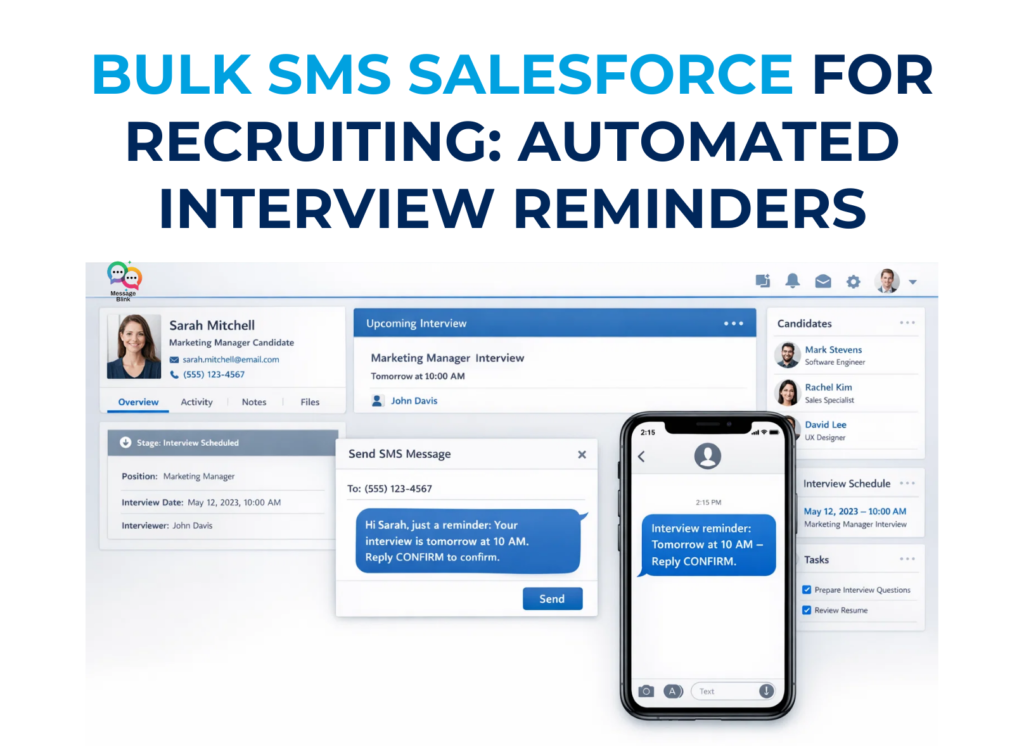
To send bulk SMS in Salesforce to 500+ candidates at once, use a native sms app like Message Blink. Simply select your candidates from a Salesforce Campaign or List View, choose an approved SMS Template, and click “Send Bulk SMS.” For high-volume recruiting, ensure your 10DLC Brand is registered to avoid carrier blocking and use Salesforce Flow to automate interview reminders 24 hours before the scheduled time.
Why SMS Works Better Than Email for Recruiting?
Recruiters increasingly prefer SMS because candidates respond much faster to text messages than emails. In 2026, where email inboxes are saturated with AI-generated noise, SMS remains a “high-trust” channel. Benefits of using Salesforce SMS for recruiting include:
-
90%+ SMS open rates compared to <20% for email.
-
Faster interview confirmations: Get replies in minutes, not days.
-
Reduced candidate drop-off
-
Automated interview reminders
With Message Blink, recruiters can manage bulk SMS campaigns directly inside Salesforce without switching tools.
Why Recruiters Prefer Native Bulk SMS in Salesforce?
In a competitive talent market, speed is everything. Using a native Salesforce SMS app means your recruiting team never has to export CSVs or leave the Salesforce CRM.
1. Unified Candidate Experience
Every text sent whether it’s a bulk campaign or a 1:1 follow-up is logged directly on the Candidate’s Contact or Lead record. This gives your entire hiring team a 360-degree view of communication.
2. High-Velocity Automation
Stop manual outreach. By using Salesforce Flow triggers, you can automate SMS interview reminders the moment an Interview record is created or updated to “Confirmed.”
How to Send Bulk SMS in Salesforce to 500+ Candidates (Step-by-Step)
Step 1: Create Your Candidate List
Filter your candidates using a Salesforce List View (e.g., “Active Applicants – Java Developer”) or add them to a Salesforce Campaign.
Step 2: Select Your Approved Template
Navigate to the Message Blink Bulk SMS component. Choose a personalized template.
-
Pro-Tip: Use merge fields like
{FirstName}and{InterviewTime}to ensure your bulk messaging feels personalized.
Step 3: Run a Compliance Check
In 2026, you must ensure all 500 candidates have opted in. Message Blink automatically filters out anyone who has opted out via “STOP”, protecting your 10DLC reputation.
Step 4: Hit Send & Track
Once sent, monitor your Delivery and Reply Rates in real-time. Native reporting allows you to see which SMS campaigns are doubling your response rates.
Recruiting SMS Comparison: Native vs. External Tools
| Feature | Message Blink (Native) | External SMS Portals |
| Data Sync | Instant (No latency) | Delayed (Sync errors) |
| Automation | Native Salesforce Flows | Complex API integrations |
| Candidate Security | Inside Trust Boundary | External Data Risk |
| AI Readiness | Agentforce Compatible | Limited AI context |
Bulk SMS Templates for Recruiters
Copy and paste these directly into your Message Blink SMS Templates.
Template 1: The Interview Reminder (High Show-Rate)
“Hi {!Contact.FirstName}, this is {!User.Name} from [Company]. Just a reminder of our interview tomorrow at {!Interview.Time}. Reply ‘CONFIRM’ to let us know you’re ready! Opt-out? Reply STOP.”
Template 2: The New Job Alert (Bulk Send)
“Great news {!Contact.FirstName}! A new {!Job.Title} role just opened that matches your profile. View details here: [Link]. Interested? Let’s chat! – {!User.Name}”
Template 3: Post-Interview Follow-Up (Automated)
“Hi {!Contact.FirstName}, it was great meeting today! We’ll be in touch by {!Decision.Date} with next steps. Have a great evening! Reply STOP to end.”