


 ChatGPT
 Perplexity
 Claude
 Google AI
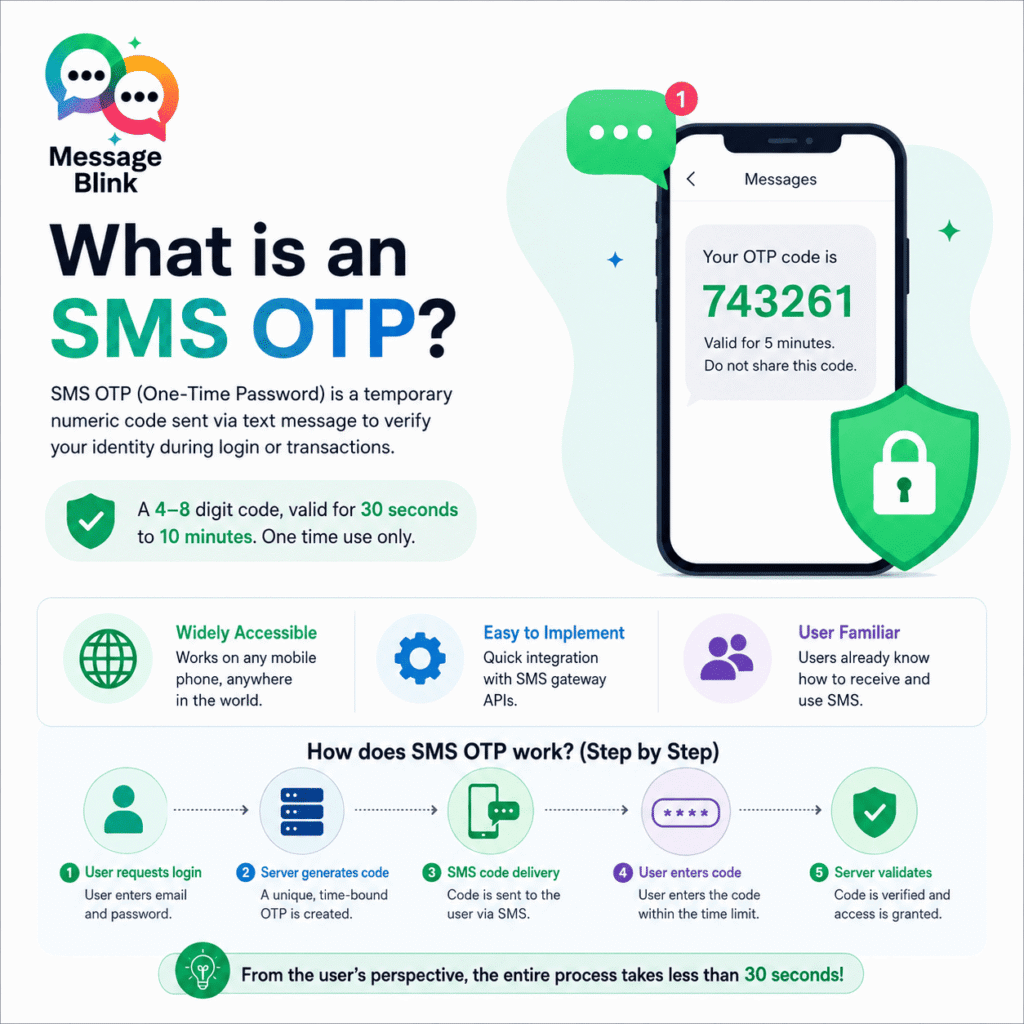
What is an SMS OTP?
SMS OTP, or SMS One-Time Password, is a temporary auto-generated numeric code sent to a user’s mobile phone via text message to verify his identity during a login or transaction process. SMS OTP is typically a 4- to 8-digit numeric code that is time sensitive, usually between 30 seconds and 10 minutes. OTP is for one-time use only.
The most widely adopted form of two-factor authentication (2FA) by companies in the banking, e-commerce, healthcare, and SaaS sectors is SMS OTP. Instead of using only a static password, which can be leaked or guessed, SMS OTP adds a second checkpoint to ensure that the person logging in actually has the registered phone number at that moment.
How does SMS OTP work? (Step by Step)
Knowing the mechanism under the hood allows the companies to assess the suitability of SMS OTP within their security setup.
Step 1 — User requests login: A user logs in to a website or app with their email and password.
Step 2 — The server generates a unique code: The authentication system creates a time-bound numeric random code and associates it with the user’s session.
Step 3 – SMS code delivery: The server sends the code to the user’s registered mobile number via SMS gateway/telecom carrier.
Step 4 — User-submitted code: The user reads the text message and enters the code into the application in the allowed time window.
Step 5 – Server validation and access grant: User is authenticated and granted access if the submitted code matches the record on the server and is still valid. The code is immediately invalidated.
From the user’s point of view, this entire process takes less than 30 seconds, and that’s why it became the default 2FA method for millions of apps worldwide.
Why is SMS OTP so widely used?
The rapid growth in adoption of SMS OTP was due to 3 practical reasons:
Worldwide: Every cell phone, no matter the model, operating system, or internet connection, can receive a text message. This allowed SMS OTP to be available to almost every user on the planet without having to download an app.
Not a large barrier to implement: Existing SMS gateway APIs let businesses integrate SMS OTP into their authentication flow without having to overhaul their identity infrastructure.
Awareness by users: Most of the users already know how to check a text message. SMS OTP had zero learning curve, unlike hardware tokens or authenticator apps.
Industry research indicates that the global two-factor authentication market was valued at around USD 14.65 billion in 2022 and is expected to exceed USD 44 billion by 2030, with SMS OTP representing a large portion of that market.
Is SMS OTP safe? Key Risks Every Business Should Know
SMS OTP is better than nothing, but it has well-documented vulnerabilities, making it a poor choice for protecting sensitive accounts or high-risk transactions. Here is a real breakdown of each risk.
SIM Swapping Attacks
A SIM swap is when a fraudster calls a mobile carrier, pretends to be the account holder, and tricks the carrier into transferring the victim’s phone number to a new SIM card that the fraudster controls.
Once successful, every SMS, including OTP codes, is routed to the attacker’s device instead of the legitimate user’s. The victim is locked out of all accounts that use their number for verification.
According to FBI data, SIM swapping in the U.S. alone cost over USD 68 million in a single year. The actual cost is thought to be much higher, as many cases are not reported.
SS7 Protocol Flaws
Signaling System No. 7 (SS7) is the global telecommunications protocol used to route calls, SMS messages, and other mobile network functions. It was conceived in 1975, long before mobile security threats became a real problem.
The SS7 protocol contains architectural flaws that allow technically savvy attackers to intercept SMS messages in transit. Bad actors can reroute text messages without ever touching the target’s phone, using the right tools, some of which can be found for free online. This means that an OTP code can be intercepted before it even reaches the intended recipient.
This is not a theoretical threat. SS7 has been exploited in targeted attacks against banks, journalists, and political figures.
Social Engineering and Smishing
The most common form of SMS OTP attack requires no technical sophistication whatsoever.
“You just have to convince a user to give you the code voluntarily.”
Smishing (SMS phishing) is the practice of sending a text message that appears to be from a trusted brand (bank, courier service, government agency, etc.) and asking the target to give their OTP code under a false pretense. A common message you’ll see is “Your account has been locked. Reply with your verification code to gain access.”
Smishing attacks have increased exponentially over the last few years, with some reports indicating an increase of over 300% in a single year. The more you use SMS OTP, the more it becomes attractive for social engineers.
Delivery failures and costs
Apart from security, the SMS OTP has a practical problem: it is not always reliable. In areas with poor network infrastructure, messages may fail to deliver, be delayed by carrier congestion, or blocked by spam filters. When an OTP doesn’t arrive, the user experience completely falls apart—an especially costly outcome in onboarding or checkout flows.
Cost-wise, companies are charged for every SMS sent, regardless of whether it is received or acted upon or not. This drives meaningful ongoing spend at scale, especially for global products that serve users in multiple regions with different telecom rates.
SMS OTP vs Other Authentication Methods
Here is a comparison of SMS OTP to the most common options for businesses evaluating their authentication stack.
| Authentication Method | Security Level | Delivery Expense | User Friction | Best For |
| SMS OTP | Moderate | Per message charge | Low | Wide reach, low-risk flows |
| Authenticator App (Time-based One-Time Password) | High | Low None | Medium | Internal tools, Tech-savvy users |
| Passkeys (WebAuthn/FIDO2) | Very High | Very Low | None | high-value accounts, repeated logins |
| WhatsApp OTP | More than SMS | LOW | Less than SMS | Markets dominated by WhatsApp, cost-effective |
| Social Login | High | Very Low | None | Consumer apps, first sign-ups |
| Email OTP | Moderate | Low | Low | Email-primary user bases |
| Biometric Authentication | Very High | Low | None | Mobile-first, secure transaction flows |
Who Uses SMS OTP and Why?
SMS OTP is used in a variety of business scenarios, like the following:
Banking and Fintech — SMS OTP is often the default second factor for transaction confirmations, login verification, password resets, and wire transfer approvals.
E-commerce—OTPs are often used for identity verification when creating new accounts, confirmation of checkout, and order-tracking alerts.
Healthcare — SMS OTPs may be used for patient portal access and telehealth appointment confirmations, but regulated environments are increasingly requiring stronger authentication.
SaaS Applications — Many B2B SaaS applications use SMS OTP to create an account for the first time or when a user tries to log in from a new device or location.
Salesforce and CRM Workflows—SMS OTP is used to validate contacts, fill forms, and multi-step authorization processes where identity validation is needed in Salesforce environments.
When to Still Use SMS OTP for Businesses:
Although SMS OTP has its limitations, it is still a valid option in some situations:
Where the user base is made up of older demographics with low smartphone app adoption
For low-risk actions where the cost of security failure is acceptable
In markets where SMS infrastructure is more reliable than data access
As a fallback method in addition to a stronger primary authentication method.
The fundamental rule: SMS OTP can’t be the only, or even the strongest, layer of authentication for sensitive accounts. Used as one layer in a wider, layered security model, it still adds value.
Better options than SMS OTP
If your product deals with sensitive data, high-value transactions, or regulated information, then these alternatives can provide a substantially higher level of security with a similar or better user experience.
TOTP Authentication Apps
Time-based One-Time Password (TOTP) applications such as Google Authenticator or Microsoft Authenticator generate codes locally on the device and do not need cellular networks. They are free from per-message costs and are resistant to SIM swap attacks. The only tradeoff is that users have to download and set up an app, which is a minor setup step.
Passkeys (WebAuthn/FIDO2)
The passkey paradigm completely replaces the classic OTP model. Instead of generating and transmitting a code, the device holds a cryptographic private key and uses biometric or PIN authentication to sign a challenge from the server. No information is sent that can be intercepted or phished.
Passkeys are being pushed by major platforms such as Apple, Google, and Microsoft and are natively supported by modern browsers and operating systems. Passkeys are the most secure option available and should be the priority for any business focused on both security and conversion.
WhatsApp One-Time Passcode
Businesses in markets with high WhatsApp penetration, including South Asia, Southeast Asia, Latin America, the Middle East, and parts of Europe, have several advantages to delivering OTP codes via WhatsApp instead of SMS. WhatsApp messages are end-to-end encrypted, generally have better deliverability than carrier SMS, and can be less expensive at scale.
WhatsApp OTP does not remove the social engineering risk altogether, but it removes the SS7 exposure and reduces cost at scale.
Biometric Authentication
Mobile biometrics—fingerprint and face recognition—in combination with device-level authentication provides a frictionless experience with very high security assurance. Biometric login, used with passkeys or that supports FIDO2 standards, is increasingly the go-to option for high-security consumer and enterprise applications.
SMS OTP Best Practices for Already Using It
If you are not yet ready to move away from SMS OTP, putting these practices in place reduces your exposure:
Set short expiration windows. OTPs should expire in 5 minutes or less. The longer the windows, the greater the chance of interception.
Limit retry attempts. Lock/Throttle accounts after some number of failed OTP attempts to prevent brute forcing.
Bind OTPs to the session context. Ensure the OTP is used from the same IP address and device session that initiated the request, adding a passive friction layer against remote attackers.
Educate users about smishing. Show a prominent message next to OTP prompts that your organization will never call or ask users to read their OTP code aloud or share it in any channel.
Look for signs of a SIM swap. Partner with your SMS provider to identify accounts where the SIM card associated with a number has recently changed, and initiate step-up authentication for those sessions.
Use reputable SMS gateways. The ability of providers to deliver reliably and monitor for fraud varies greatly. Select a gateway that has a history of fraud detection and fallback routing.
Conclusion
SMS OTP is an important part of the history of digital authentication. It brought two-factor verification to the masses at a time when no simpler, more secure alternative had that kind of reach. For many businesses, it still has a practical role in lower-risk authentication flows.
But as threat actors become more sophisticated, and attack vectors such as SIM swapping and smishing become more prevalent, SMS OTP alone is no longer a sufficient security posture for applications with sensitive user data, financial transactions, or regulated information.
For most businesses, the answer isn’t an immediate switch but a gradual transition: adding passkeys, TOTP, or WhatsApp OTP where the use case allows it and using SMS OTP as a backup rather than a primary verification method.
So, the first step towards getting there with confidence is to understand what SMS OTP is, how it works, and where its limits are.