The Message Blink Salesforce SMS Inbox (My Inbox) allows users to manage all incoming SMS and WhatsApp messages directly inside Salesforce in real time. With prioritized unread message sorting, instant notifications, and a clean Utility Bar interface, teams can respond faster and never miss an important customer message.
Accessing the Salesforce SMS Inbox (My Inbox) #
- Open Message Blink from the Salesforce App Launcher.
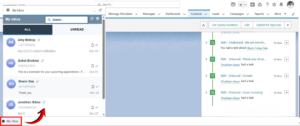
- At the bottom-left corner of your Salesforce screen, you will see the My Inbox / Utility Bar.

- Click My Inbox to open your centralized Salesforce SMS & WhatsApp conversation panel.
Viewing All SMS & WhatsApp Conversations #
Inside My Inbox, users can instantly view:
- All SMS conversations synced with Salesforce
- Unread SMS messages highlighted with a notification badge
- Real-time incoming messages from customers
- Conversation previews showing the latest text received
Message Blink keeps your Salesforce SMS workflow fast and organized

Filter and View Only Unread SMS in Salesforce #
To prioritize the most important customer messages:
- Click the Status Filter at the top of My Inbox.
- Select Unread to view only unread SMS messages and pending conversations.
- Each unread thread displays a visible unread count so agents know which chats need immediate attention.
This helps users streamline communication, improve response time, and manage their Salesforce SMS inbox more efficiently.
Respond to SMS & WhatsApp Messages Instantly #
- Click any conversation to open the full thread.
- Type your reply in the Message Box and click Send.
- Users can unsubscribe contacts directly inside the chat if required.
Message Blink ensures quick and seamless SMS replies inside Salesforce without switching between apps.
Mark Conversations as Read #
Once you’ve opened or reviewed a message:
- Click the checkmark (✓) to mark the SMS as Read.
- The unread badge disappears, helping users keep their Salesforce SMS inbox organized.
Conclusion #
Message Blink’s Live Inbox or Utility Bar make it easy for Salesforce users to stay on top of customer communication. With real-time notifications, unread SMS filtering, and instant reply capabilities, teams can work faster, reduce delays, and deliver better customer engagement- without ever leaving Salesforce.
Whether you’re managing hundreds of customer chats or simply keeping track of daily messages, Message Blink ensures your Salesforce SMS and WhatsApp communication stays efficient, organized, and fully streamlined.


