If you want to send Bulk SMS in Salesforce without exporting data or switching between multiple tools, using Salesforce List Views is the fastest and most efficient way. With the best Salesforce SMS app like Message Blink, you can instantly pull your records from List Views, select your recipients, personalize your text messages, and send them in one go.
What are Salesforce List Views? #
Salesforce List Views are customizable, filtered lists of records from any Salesforce object – such as Leads, Contacts, Accounts, Cases, or even Custom Objects. They allow users to:
- Apply filters and display only the records they want
- Sort and organize data
- Choose between table view, Kanban view, or split view
- Perform actions like inline editing
- Quickly locate targeted groups of records for messaging or follow-ups
When you combine List Views with a Salesforce SMS app, they become a powerful tool to send mass text messages to segmented audiences in seconds.
Steps to Send Bulk SMS from Salesforce List Views Using Message Blink #
Follow the steps below to send bulk SMS messages through Salesforce List Views:
1. From the App Launcher, Open Message Blink
2. Click contacts, leads or any custom object tab you want to send SMS from.
3. Create a custom list or select any existing list.
- Click the small settings icon (⚙️) on the top-right corner of the List View panel.
- Choose Create New List View or Edit List Filters.
- Apply filters such as location, status, owner, or custom conditions.

4. Navigate to “Send bulk SMS” tab
5. Select Object, List view and Phone field.
- The Salesforce Object (e.g., Lead, Contact, Account)
- The List View you want to use
- The Phone Field (Mobile, Phone, or custom phone field)
6. Then hit on Search Records
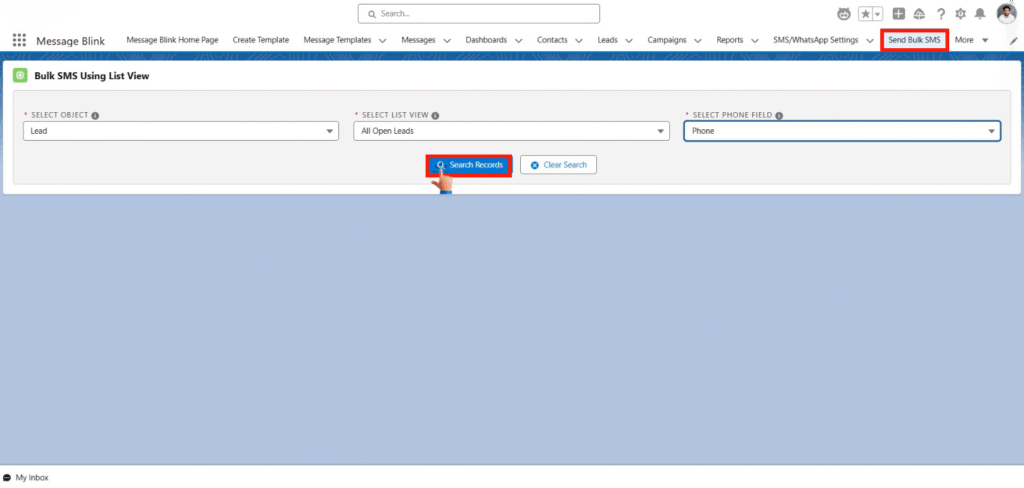
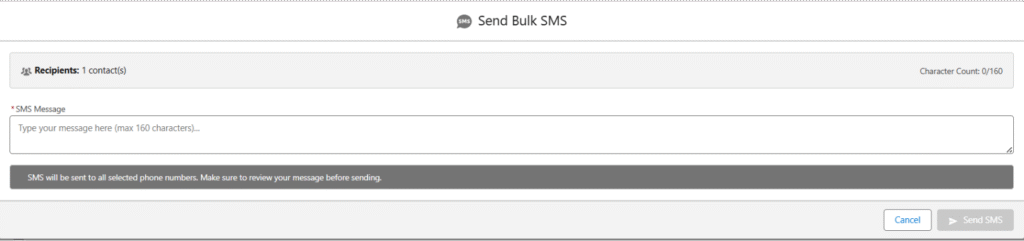
7. Select the Recipients and then click on send bulk sms button

8. Then Draft your SMS and hit on Send SMS.
Conclusion #
Sending Bulk SMS from Salesforce List Views is one of the simplest ways to reach a targeted audience fast. With Message Blink , users can:
- Send mass text messages
- Automate engagement
- Personalize communication
- Work across all objects
- Stay 100% inside Salesforce
This method saves time, boosts productivity, and helps teams maintain consistent communication without any manual work.


