
Contact Us
 UK +44 (734) 008 7301
 USA +1 (737) 395 8587
Contact Us
UK +44 (734) 008 7301
USA +1 (737) 395 8587
 Available on AppExchange
4.9/5★★★★
Available on AppExchange
4.9/5★★★★
 Meta Tech Provider
The Only Salesforce Messaging App
Send SMS, WhatsApp, Voice & AI messages directly from Salesforce - no middleware, no connectors, no distraction.
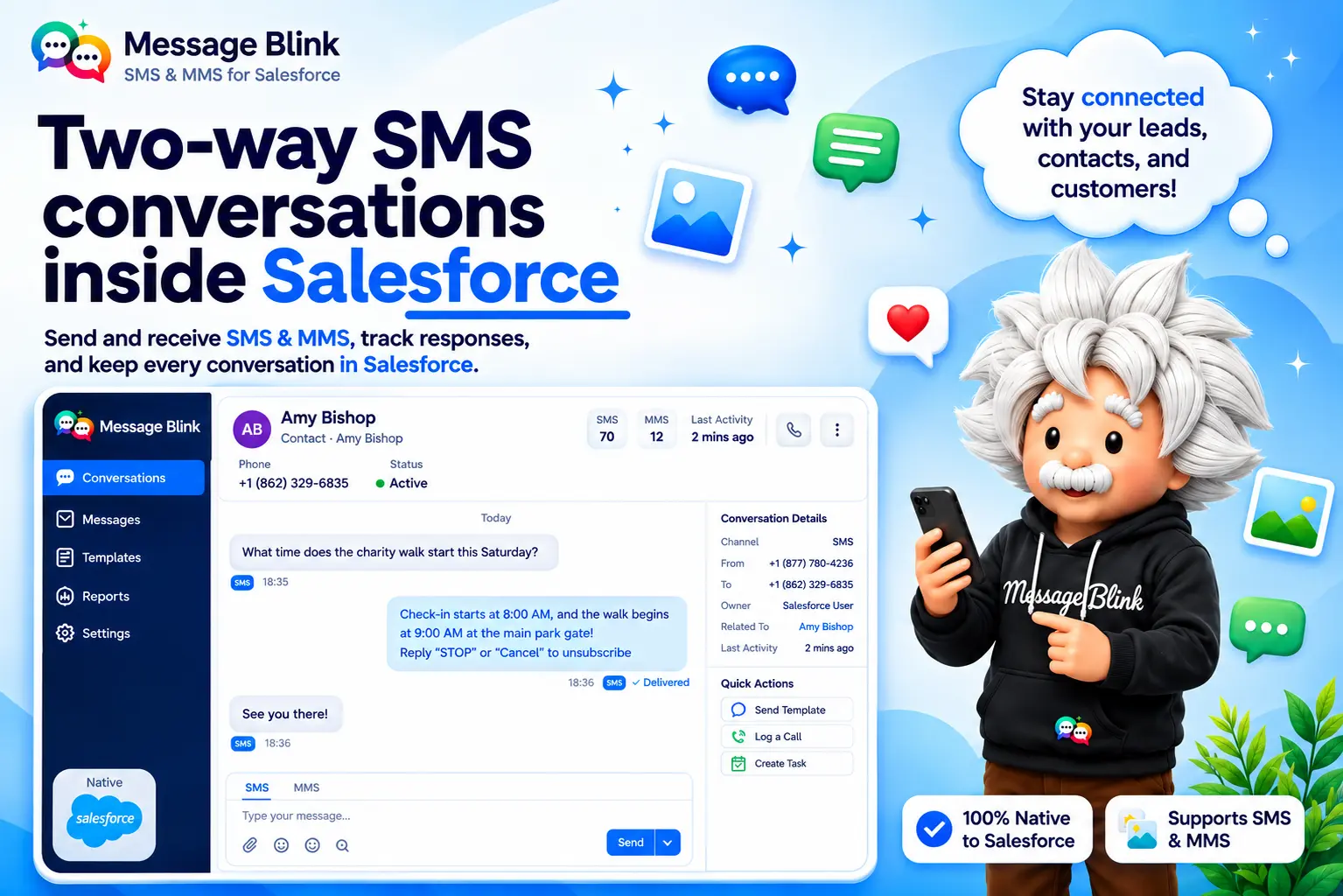














Send your first Salesforce message in under 5 minutes.
No dev team. No middleware.
Just install from AppExchange and go.
A 5-minute AppExchange install, then send your first message right from Salesforce.
The results speak for themselves.
Real numbers from real Salesforce teams using MessageBlink.
Based on MessageBlink customer data, 2026.
We've heard these exact words from Salesforce teams.
So we built exactly what they were asking for
A 100% Salesforce-native messaging platform - built by the ex-Salesforce ISV PAM who saw first-hand what real teams needed and what others kept getting wrong.
Read the story →One platform. Every channel 🤝
Everything your team needs to reach customers - without a single connector or middleware tool.







Give every team the power to text in Salesforce


INDUSTRIES
Built for teams across every industry
Every industry runs on Salesforce. Now every industry can text from it too.
| Industry | Icon | Description |
|---|---|---|
| Nonprofits | Donor outreach, fundraising campaigns & volunteer coordination from Salesforce NPSP. | |
| K-12 Schools | Enrollment reminders, attendance alerts & parent communication from Education Cloud. | |
| Foundations | Grant application updates, impact reporting & donor stewardship messaging. | |
| Arts & Culture | Membership renewals, event invitations & patron engagement for cultural orgs. | |
| Healthcare Organizations | HIPAA-compliant appointment reminders, care gap closures & patient engagement. | Life Sciences | HCP visit confirmations, patient support reminders & sample alerts sent straight from Salesforce. |
| Real Estate | New Listing alerts, open house invites & client follow-ups from your CRM. | |
| Financial Services | Payment alerts, fraud confirmations & advisor follow-ups from your CRM. | |
| Consumer Goods | Order updates, shipment tracking & restock alerts sent straight from your CRM. | |
| Manufacturing | Production status, delivery schedules & inventory alerts sent straight from your CRM. | |
| Professional services | Appointment reminders, client updates & invoice notifications sent straight from your CRM. | |
| Retail | Order confirmations, delivery updates & promo alerts sent straight from your CRM. | |
| Travel Hospitality | Booking confirmations, check-in reminders & concierge alerts sent straight from your CRM. | |
Why I built MessageBlink
Salesforce
7 years inside the Salesforce ecosystem - close enough to see exactly what partners and customers were up against.
AppExchange partners
Managed the ISV partners building on Salesforce - including the very SMS vendors customers kept complaining about.
Customer pain points
Heard the same complaints on repeat months to implement, clunky UI, hidden fees, zero real support.
Industry insights
Saw the same failures across 8 industries - and realised no one with inside knowledge was fixing them.
Message Blink
So I built the tool I wished existed - 100% Salesforce -native, no middleware, no compromises.
An AI-powered future
Growing fast - with Agentforce and AI at the core of everything we ship next.

Shubham Kesar
Founder, Sastorm Software
Before founding Sastorm Software, I spent 7 years at Salesforce helping ISV partners grow and succeed on AppExchange.
I worked directly with messaging vendors, partner teams, and customers across 8 industries. I had a front - row seat to what kept going wrong - and why no one was fixing it.
So I started with one employee and a clear mission. Today we're a lean, focused team - building the Salesforce messaging platform that should have existed years ago.
Built for Salesforce. Not bolted onto it.
Many vendors split attention across services. Every hour here goes into the product and the customers using it.
Traditional vendors
Engineering hours go to one-off client projects, not your product.
New features wait while the services team takes priority.
Your roadmap moves based on whoever's available that week.
You wait months for fixes that should ship in days.
Real Salesforce teams. Real results. Watch their stories.
"The native Salesforce integration is flawless. Hours saved. Every conversation synced and accessible - automatically."
Benji Berlow
Director of Operations and Innovation
"Their AI workflows didn't just automate our messages, they actually improved the quality of our lead qualification process."
Michael Tubin
Motto Mortgage
"MessageBlink transformed our client communication - 40% more responses in the first month alone."
Gregor Wechner
Travel Business
"We were looking for an intuitive way to automate SMS, and Message Blink delivered exactly what we needed."
Alex Warneke
Certified Salesforce Professional
What the Salesforce ecosystem said before MessageBlink existed.
A track record built inside Salesforce - before a single line of MessageBlink was written.

"What stood out about Shubham was his maturity and business acumen. He delivered excellent results and managed complex contracts perfectly."
LinkedIn recommendation
"Shubham is a fantastic operator who demonstrates tenacity, integrity and a results-orientation. He has the work ethic and creativity to always find a way to over-achieve on his numbers and objectives."
LinkedIn recommendation
"Shubham was an integral member of our Partner team. His strategic approach consistently yielded measurable impact in the region."
LinkedIn recommendation
Shubham is highly reliable, adaptable, and possesses excellent partner development skills that enable him to collaborate effectively with ISV partnership and to accelerate their GTM motions.
LinkedIn recommendation
"Shubham has a remarkable set of skills in partner management and go-to-market strategies. He navigates complex collaborations with finesse."
LinkedIn recommendation
"Shubham’s ability to go out of his way to help others makes him stand out.Thanks a lot, for making our Salesforce ISV partnership smooth and more comfortable."
LinkedIn recommendation